Cross Stitch: Color by Number
- 4.4
- Rating
- 10.00M
- Installs
- Free
- Price
 Analysis by App-foxy
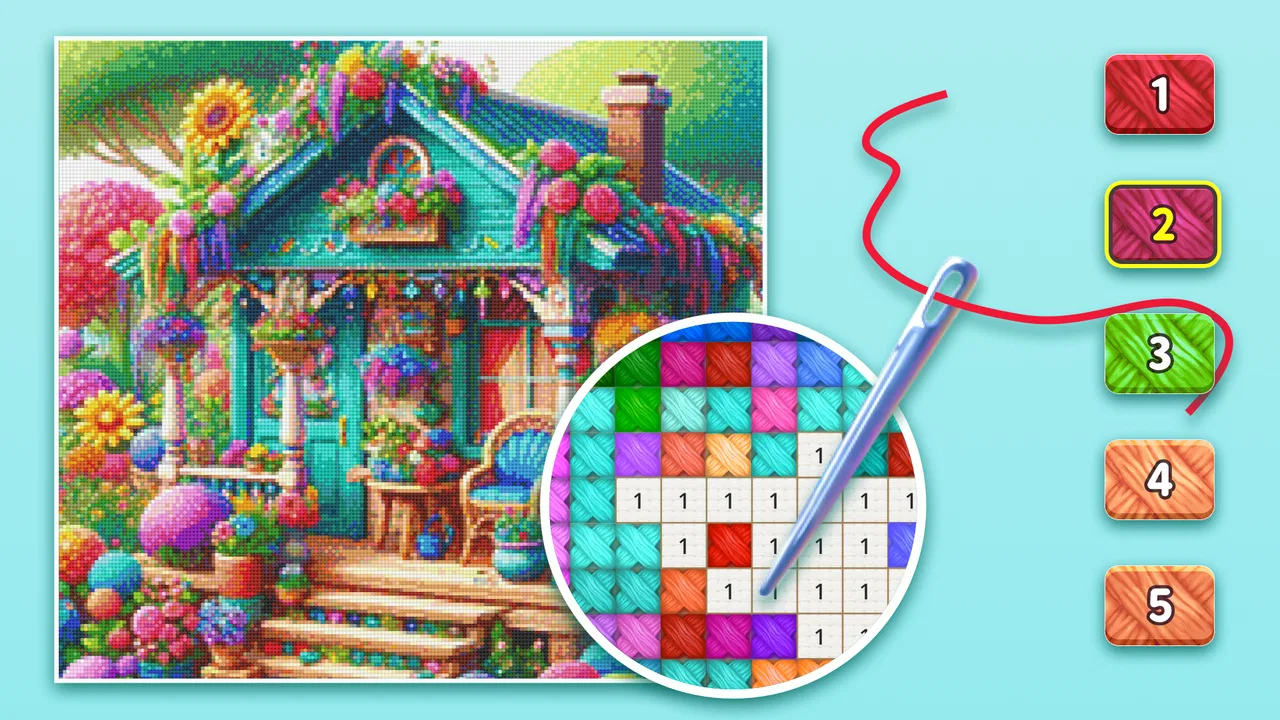
I approached Cross Stitch: Color by Number expecting a simple time-killer, but I found a more focused kind of board game: one that turns the familiar logic of coloring by number into a digital stitching routine. Its central appeal is easy to understand. You choose an image, match colors to numbered spaces, and gradually watch a cross-stitch pattern take shape on your phone. The result is calm, tactile in spirit, and surprisingly easy to pick up when I only have a few spare minutes.
That simplicity is also the reason I would not recommend it to everyone. This is not a replacement for making a physical embroidery project, and it does not offer the same sense of material, texture, or lasting craft. Instead, it works best as a low-pressure screen activity for people who enjoy visual completion, repetitive tasks, and small moments of progress. After spending time with it, my view is clear: it is a polished casual board game for relaxing, provided you are comfortable with a free experience that includes optional purchases.
How the digital stitching loop feels in everyday use
The game’s main interaction is straightforward, but it has enough visual feedback to make each completed section feel worthwhile. I select a color or numbered symbol, locate the matching cells, and fill them in. The image becomes clearer as I work, which gives the session a gentle sense of discovery. I never need to learn complicated rules before starting, so the game is approachable even if I have no knowledge of real cross-stitch techniques.
You May Also Like

 Pandora - Music & Podcasts
Pandora’s Music Is Easy to Start, but Harder to Recover
Pandora’s strength is its low-effort path from a seed to a station. Its weak spot is how much confidence it asks you to place in connection, setup, and quiet recovery.

 AccuWeather: Weather Radar
AccuWeather Review: A Quick, Clear Forecast for Everyday Decisions
For everyday plans, the best forecast is the one you can understand quickly. AccuWeather makes rain timing, radar, and local conditions easy to act on, with a few trade-offs.

 Hill Climb Racing
Why Hill Climb Racing Still Turns Crashes Into One More Run
A tiny car, a bumpy hill and one more upgrade: Hill Climb Racing keeps resurfacing because its simple chaos makes every near-miss feel personal.

 AliExpress - Shopping App
AliExpress Makes Global Shopping Feel Personal, but Shoppers Bear the Risk
AliExpress turns a global marketplace into a pocket-sized discovery engine. Its reach is useful, its shopping loop compelling, and its trade-offs easy to miss.

 Lords Mobile: Kingdom Wars
Lords Mobile Is a Kingdom-Building Routine, Not a Quick Match
A case-by-case verdict on the building, battles, device demands, and social commitments that make Lords Mobile rewarding for some players and exhausting for others.

 PDF Scanner app - TapScanner
TapScanner Makes Paperwork Easier to Capture, Check, and Share
TapScanner makes scanning with a phone feel less like a rescue operation and more like a dependable step in getting work done. Its capture tools are useful, though not flawless.
More From Our News Desk
View All News


What makes the format effective is the combination of a board-game structure and a coloring activity. It is more organized than freehand drawing because every move has a defined place, yet it remains less demanding than a traditional strategy board game. There is no opponent to beat and no complicated plan to memorize. My attention stays on recognizing the next matching spaces and deciding how much of the picture I want to complete before stopping.
I found that the best sessions are short and deliberate. For example, if I am waiting for an appointment or winding down after dinner, I can open a pattern and finish a small cluster rather than commit to a long play session. The visible progress makes it easy to return later. This is particularly useful for anyone who likes checking off small tasks but does not want the pressure of a timer, a leaderboard, or a competitive objective.
The phone format also changes how I think about cross-stitch imagery. A physical project needs fabric, thread, a needle, storage, and a suitable place to work. Here, the entire activity is contained on the screen. That convenience is a genuine strength, especially for travel or for people who enjoy the look of stitched designs but do not want to manage craft supplies. The trade-off is equally clear: digital completion is cleaner and faster, but it cannot provide the physical satisfaction of handling a finished piece.
The developer, Eyewind, positions this as a free game in the board category, and that description fits better than calling it a drawing tool. I am not creating an image from scratch. I am solving a visual grid by placing the correct colors in the correct locations. That distinction matters when deciding whether it suits you. Anyone looking for creative freedom may find the process restrictive, while players who enjoy orderly patterns will probably appreciate its structure.
Why the visual progress is the strongest part
The most convincing reason to keep playing is the way a vague collection of numbered spaces gradually becomes a recognizable picture. Early on, a pattern can look fragmented and slightly confusing. As more areas are completed, the subject starts to emerge, and that change gives ordinary taps a satisfying purpose. I often found myself continuing not because the individual moves were challenging, but because I wanted to see the complete image.
This makes the game a good fit for people who enjoy sorting, matching, and visual organization. It also creates a useful rhythm for distracted moments. Instead of switching between several demanding apps, I can focus on one small visual problem at a time. The activity is engaging enough to hold my attention, but generally gentle enough to feel restful rather than exhausting.
A practical tip is to avoid treating every pattern as something that must be finished in one sitting. Working through one color family or one clearly defined area can make the board feel more manageable. It also reduces the temptation to tap randomly when several symbols are close together. I get more enjoyment when I treat each illustration as a sequence of small sections instead of one large obligation.
Another useful habit is to play with a clear stopping point in mind. Completing a visible portion before putting the phone away gives the session a natural ending. Without that boundary, the simple loop can become repetitive, especially on larger or more detailed pictures. The game is at its best when I use its steady pace intentionally rather than letting it fill every idle moment automatically.
Using personal photos changes the experience
One of the more interesting aspects is the ability to work with my own photos. That option gives the activity a personal layer that preselected artwork cannot provide. A picture of a pet, a favorite place, or a family moment can feel more meaningful when it is gradually translated into a cross-stitch-style image. The emotional connection comes from the source image, not from any complicated gameplay system.
However, personal photos also require a little judgment. A clear image with a strong subject is likely to be more satisfying than a dark, crowded, or visually messy snapshot. If too many details compete for attention, the resulting pattern can feel harder to read and less rewarding to complete. I would choose images with recognizable shapes and good contrast rather than relying on a random photo from my camera roll.
This feature also creates a useful distinction between casual play and personal projects. If I simply want a quick distraction, a ready-made design is more convenient. If I want to make the activity feel connected to my own life, a personal photo is the better choice, even though preparing the right image may take more thought. That flexibility helps the game serve different moods without changing its basic controls.
I would not treat the photo option as a full photo-editing workflow. Its purpose is to turn an image into something I can color by number, not to give me detailed control over every visual decision. If I want precise artistic control over composition, palette, or stitching style, a dedicated drawing or craft application would be more appropriate. Here, the appeal is the transformation and the completion process.
Where the free model creates friction
The game is free to start, which makes it easy to try without committing money upfront. Optional in-app purchases range from $1.99 to $59.99 per item, so I would pay attention to the purchase flow and decide in advance how much the experience is worth to me. A free download can be perfectly reasonable for occasional play, but frequent players may feel more pressure if they want access to more content or a smoother progression.
That commercial structure is the main limitation I would mention to a friend. The basic activity is relaxing, yet the surrounding decisions about available content and optional spending can interrupt that calm feeling. I prefer to approach it with a firm rule: enjoy what is available without assuming that every appealing pattern needs to be unlocked. This mindset keeps the game from turning a quiet pastime into an unplanned expense.
There is also a repetition trade-off. Matching numbers and filling cells is satisfying at first, but the underlying interaction remains consistent. Players who need constant novelty, strategic depth, or changing objectives may lose interest. Compared with a traditional board game, there is little social tension and no meaningful competition. Compared with a physical cross-stitch kit, there is no real-world object to display afterward.
Those limitations are not deal-breakers for me because they are tied to the game’s purpose. It is designed around a predictable, soothing loop rather than challenge escalation. Still, I would skip it if I wanted a game that tests planning, rewards mastery, or gives me a strong reason to play with friends. A puzzle board game with evolving rules would be a better alternative for that audience.
Device compatibility is also worth considering before installing. The game requires Android 6.0 or later, which covers many older devices but does not include every phone still in use. The current version is 2.14.0, and the game has been available since April 7, 2017. Those details suggest a long-running product rather than a brand-new experiment, but they do not change the basic expectation: the experience is centered on casual touch interaction, not high-performance graphics or complex controls.
Who will get the most from it
I think the strongest audience is anyone who likes coloring apps but wants a more guided structure. Free coloring can feel too open-ended, while this game tells me exactly where each color belongs. It is also suitable for people who enjoy organizing visual information, completing collections of small tasks, or relaxing with repetitive actions. The Everyone age rating makes it broadly accessible, although younger players may still need guidance around optional purchases.
It can work well as a quiet family activity, but I would describe it as shared screen time rather than a multiplayer board game. One person can choose an image while another suggests which area to complete next. That makes it easy to involve a child or a relative without requiring both people to understand complicated rules. The experience remains individual, though, so anyone expecting direct competition or cooperative turns should choose a different type of game.
People who are curious about cross-stitch but hesitant to buy physical materials may also find it a useful introduction to the visual language of patterns. It shows how small colored marks combine into a larger image without requiring needles or thread. I would not call it training for actual embroidery, but it can help someone decide whether they enjoy the patience and repetition associated with that craft.
On the other hand, I would steer away from it if you dislike tapping through grids or if repetitive tasks quickly become frustrating. It is also a poor fit for players who want deep customization, a story, or a sense of competitive achievement. The personal-photo option adds emotional interest, but it does not transform the game into a full creative studio. Knowing that limitation beforehand prevents disappointment.
The game’s popularity gives it some useful context: it has passed ten million installs, with an average rating of 4.4 from roughly one hundred ninety-five thousand ratings and about nineteen thousand written reviews. I read those figures as evidence that the basic loop has broad appeal, not as proof that every player will enjoy it. A large audience can confirm that the concept works for many people while still leaving room for individual preferences about repetition, purchases, and digital craft.
My verdict after weighing convenience against depth
Cross Stitch: Color by Number succeeds because it understands exactly what kind of game it wants to be. It is not trying to replace a competitive board game, teach professional embroidery, or offer unrestricted digital art. Instead, it gives me a tidy visual task that I can start quickly, pause easily, and revisit whenever I want a calm distraction. The ability to use personal photos gives the format more character than a completely generic coloring activity.
My main advice is to treat it as a casual relaxation tool, not as an endless content platform. Choose images thoughtfully, work in manageable sections, and keep optional spending under control. Those small choices make a noticeable difference because the game’s strengths are concentration and completion, while its weaknesses are repetition and the possibility of commercial interruptions.
For someone who wants a free, approachable board-style game with a cross-stitch theme, I would recommend giving it a try. It is especially appealing when I want something more focused than scrolling but less demanding than a traditional puzzle. I would choose another option for social competition, serious strategy, or hands-on crafting. For the right player, though, this is a pleasant digital stitching habit: simple, personal when I want it to be, and satisfying in small doses.
FAQs for Cross Stitch: Color by Number
01What is Cross Stitch: Color by Number?
Cross Stitch: Color by Number is a relaxing mobile coloring game that recreates the experience of stitching designs on a digital canvas. Instead of using thread and fabric, you select numbered sections and fill them with the matching colors. The app typically includes animals, flowers, landscapes, characters, and other decorative patterns suitable for short sessions or longer creative breaks.
02How do you play Cross Stitch: Color by Number?
Gameplay is based on matching colors with numbered stitches. Choose a design, select the required color, and tap or drag across the corresponding spaces to complete each section. As the picture develops, the app provides visual progress and completion feedback. The controls are generally simple, making it accessible to beginners, while more detailed patterns can provide an additional challenge.
03Is Cross Stitch: Color by Number free to download and play?
The game can generally be downloaded for free, but some content or features may be supported by advertisements, optional purchases, or premium subscriptions, depending on the version and platform. Free players may still have access to a selection of patterns, while additional designs, tools, or ad-free use could require payment. Check the store listing for current pricing.
04Does Cross Stitch: Color by Number work without an internet connection?
Some basic features and previously loaded patterns may work offline, which is useful when traveling or when mobile data is unavailable. However, an internet connection may still be required for downloading new artwork, displaying advertisements, synchronizing progress, receiving updates, or accessing online events. Offline availability can vary by device and app version, so test your preferred designs before going offline.
05Is Cross Stitch: Color by Number suitable for children?
The simple tap-to-color mechanics make Cross Stitch: Color by Number easy for many children to understand, and the creative format can encourage concentration and patience. Nevertheless, parents should review the app’s age rating, advertising, in-app purchase options, and privacy settings before allowing unsupervised use. Younger players may also need help with purchases or any more detailed designs.
Pros
- Relaxing gameplay suitable for short or extended sessions.
- Large variety of patterns across different themes.
- Simple controls make it accessible for beginners.
- Offline play is available for many designs.
- Completed artwork can be saved and shared easily.
Cons
- Some patterns and tools may require in-app purchases.
- Frequent ads can interrupt the coloring experience.
- Detailed designs may feel repetitive over time.
- Small stitches can be difficult to select on phones.
- Progress may depend on account or device syncing.

Cross Stitch: Color by Number
Gallery